

Activity log
What the Activity page records, who can read it, how to pull entries over the API, and where to see what a device is doing now.
The Activity page records what happens in the organization: changes made in the dashboard or over the API, plus sign-ins and sign-outs, two-factor and passkey changes, and device sign-ins the organization refused. Each entry says what happened, who or what did it, from which address when there is one, and when. It is always on, and you read it in the dashboard or over the API.
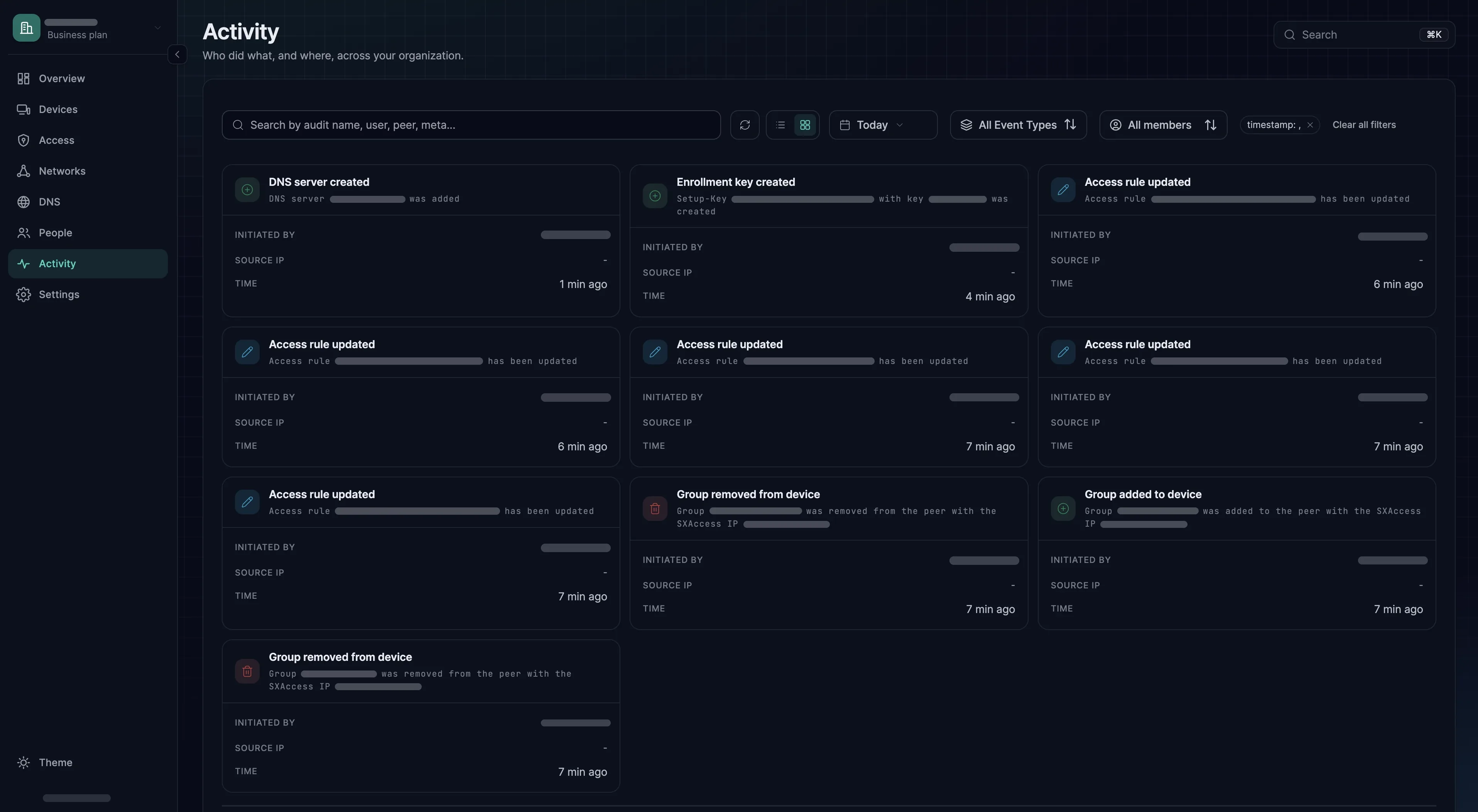
Finding an entry
The page opens on the last 14 days. Above the entries you can:
- pick a date range;
- filter by event type, for example only access rule changes;
- filter by member, meaning who did it;
- search event names, people, devices and the details stored with each entry.
There is no export. To keep entries elsewhere, pull them over the API, as described below.
What gets recorded
A selection of entries, by area, each with its activity code. A few event names in the product still use older words; the code identifies the event either way. The search box of the event type filter (All Event Types) matches these codes, and the API returns them in activity_code.
| Area | Examples |
|---|---|
| Devices | "Device added" (device.added_by_user when someone signs in on it; device.added_with_enrollment_key with a key, whose name is then in the details), "Device deleted" (device.deleted), "Device renamed" (device.renamed), "Group added to device" (device.group_added), "Device login expired" (device.login_expired), "Device sign-in refused" (device.sign_in_refused) |
| People | "Member invited" (user.invited), "Member joined" (user.joined), "Member role updated" (user.role_updated), "Member blocked" (user.blocked), "Member unblocked" (user.unblocked), "Member deleted" (user.deleted), "Group added to member" (user.group_added), "Transferred owner role" (user.owner_role_transferred) |
| Sign-in | "Dashboard login" (user.signed_in_to_dashboard), "Member signed in" (user.signed_in), "Member signed out" (user.signed_out), "Member session ended after inactivity" (user.session_ended_idle), "Member signed in on device" (user.signed_in_on_device), "Member attempts throttled" (user.attempts_throttled), "Member refused entry, second factor required" (user.tenant_mfa_refused) |
| Two-factor and passkeys | "Member second factor added" (user.mfa_factor_added), "Member second factor removed" (user.mfa_factor_removed), "Member two-factor reset" (user.mfa_reset), "Member passkey added" (user.passkey_added), "Member passkey removed" (user.passkey_removed), "Member connected a sign-in provider" (user.idp_linked), "Member password changed" (user.password_changed) |
| Access | "Access rule added" (access_rule.added), "Access rule updated" (access_rule.updated, also when a rule is switched on or off), "Access rule deleted" (access_rule.deleted), "Device requirement created" (device_requirement.created), "Device requirement updated" (device_requirement.updated), "Device requirement deleted" (device_requirement.deleted) |
| Keys and tokens | "Enrollment key created" (enrollment_key.created), "Enrollment key revoked" (enrollment_key.revoked), "Enrollment key deleted" (enrollment_key.deleted), "API token created" (api_token.created), "API token deleted" (api_token.deleted), "Service account created" (service_user.created), "Service account deleted" (service_user.deleted) |
| Networks and DNS | "Network created" (network.created), "Network resource created" (network_resource.created), "Routing device created" (connector.created), "Route created" (network_route.created), "Route deleted" (network_route.deleted), "DNS server created" (dns_server_group.created), "DNS server updated" (dns_server_group.updated) |
| Organization | "Organization settings updated" (organization.settings_updated), "Organization two-factor requirement enabled" (organization.mfa_required_enabled), "Organization passkey sign-in enabled" (organization.passwordless_enabled), "Organization device login expiration enabled" (organization.device_login_expiration_enabled), "Member group propagation enabled" (organization.group_propagation_enabled), "Organization DNS domain updated" (organization.dns_domain_updated) |
Who can read it
Members with the Owner, Admin, Network Admin or Auditor role, and service accounts. Members with the User role do not see the Activity page, and the API answers them with 403. See Roles and permissions.
Pulling entries out
GET https://app.sxaccess.com/api/activity returns the newest 10,000 entries, newest first, with no paging and no filters; the Activity page shows the same list. Each entry carries an id, a timestamp, its name in activity, a machine-readable code in activity_code, who did it in initiator_id, initiator_name and initiator_email, what it acted on in target_id, and its details in meta. Filter on activity_code rather than on the name.
To ship entries to a SIEM or to storage of your own, poll on a schedule and de-duplicate by id. Every call returns the newest 10,000 again, so consecutive pulls overlap; poll often enough that more than 10,000 new entries never pile up between two pulls. Use a service account with the Auditor role: it can read everything and change nothing, which is exactly what a log shipper needs. The endpoint is described with the rest of the API in Public API.
curl -sS https://app.sxaccess.com/api/activity \ -H "Authorization: Token $SXACCESS_TOKEN" \ | jq -c '.[] | {id, timestamp, activity_code, initiator_email, target_id, meta}'From the machine's point of view
Activity tells you what the service knows. For what one machine is experiencing right now, run sxaccess info -d on it: it lists the other devices it knows about, each with its state, its path (P2P or Relayed), round trip, last handshake and traffic transferred. For an intermittent fault, sxaccess diagnose capture 5m logs at trace level for five minutes, then saves a bundle for support and prints its location. It reconnects the device first, so sessions running over SXAccess drop.